MTConnect gives machine observations a shared manufacturing vocabulary; OPC UA provides information models and communication services that can include authorized writes and method calls. For machine data collection, compare the fields and meaning each implementation supplies. For PLC recipes or commands, select a documented controller interface with explicit permissions and completion feedback.
The choice can combine both standards: the MTConnect–OPC UA companion specification brings MTConnect semantics into OPC UA. Start with the comparison below, then use the selection checklist to separate monitoring requirements from command requirements within your industrial connectivity design.
| Decision | MTConnect observation interface | OPC UA implementation |
|---|---|---|
| What gives data its meaning? | Manufacturing terms and semantic models | The information model implemented by the server, potentially including companion specifications |
| How does an application receive data? | An Agent serves device descriptions and observations; HTTP/XML is common | Reads, plus data-change or event notifications through MonitoredItems and Subscriptions |
| How are machine commands handled? | Use a separately supported controller interface; uploading observations to an Agent is a different operation | Write or Call may provide the path when the server exposes it and the user is authorized |
| Which components are needed? | Native support or translation where needed, an Agent and a consuming application | A supported server and client; model translation only where the application requires it |
The MTConnect Institute’s fundamentals and FAQ establish the semantic model; OPC Foundation Part 4 defines the UA services. These are distinct dimensions of the interface decision. Technical references
What MTConnect contributes to machine data
MTConnect standardizes the meaning of observations so applications can interpret machine information consistently. An adapter translates native device data where needed. An Agent collects and organizes those observations and serves them to a monitoring or analytics application. Native implementations can supply these functions without a separate adapter installation; the functions may run together or on different hosts.
The Institute’s Overview and Fundamentals, version 1.7.0, describes HTTP and XML implementations while explicitly allowing the semantic models to use other transports and encodings. The reference C++ Agent also documents JSON output configuration. Check the encoding accepted by the application and supplied by the chosen Agent. 1, 2, 5, 6

For the HTTP interface, begin with probe to inspect the device description and available data items. Current retrieves current observations; sample retrieves observations within the sequence range still available from the Agent. Those operations answer different questions: what exists, what is current, and what observations can still be retrieved. 1
Three representative items show why that distinction matters:
| Data item | Meaning | Check before using it |
|---|---|---|
Execution |
Execution status of the controller | How the supplied state maps to the application’s operating-state categories |
Availability |
Availability of the device or component for communication | Whether the adapter reports it directly or the Agent derives it from connectivity |
PathFeedrate |
Feed rate of the tool path | The unit and whether the subtype represents actual or commanded feed rate |
The connectivity guide defines these foundational examples. The reference Agent’s AutoAvailable setting can set availability on connection. Consequently, communication availability alone cannot establish productive uptime or the Availability factor in OEE. Define that business metric separately from the connection status. 2, 6
Does read-only MTConnect allow an Agent to receive uploads?
Yes: an Agent may receive observations while the machine acquisition path remains read-only. Receiving a value at the Agent and changing a value inside the controller have different destinations and effects.
Mitsubishi Electric’s Machine Tool Connectivity documentation describes its MTConnect adapter as read-only: it captures NC data and sends it to an Agent. The MTConnect observation model likewise centers on retrieving machine information. A recipe download or start request needs a controller interface designed to perform that action. 1, 7
Separately, the MTConnect Institute’s reference C++ Agent documents optional HTTP PUT/POST ingestion of data-item values and assets, controlled by settings including AllowPut and AllowPutFrom. An uploaded program observation changes what the Agent reports. It does not establish that the machine has loaded or activated that program. 2
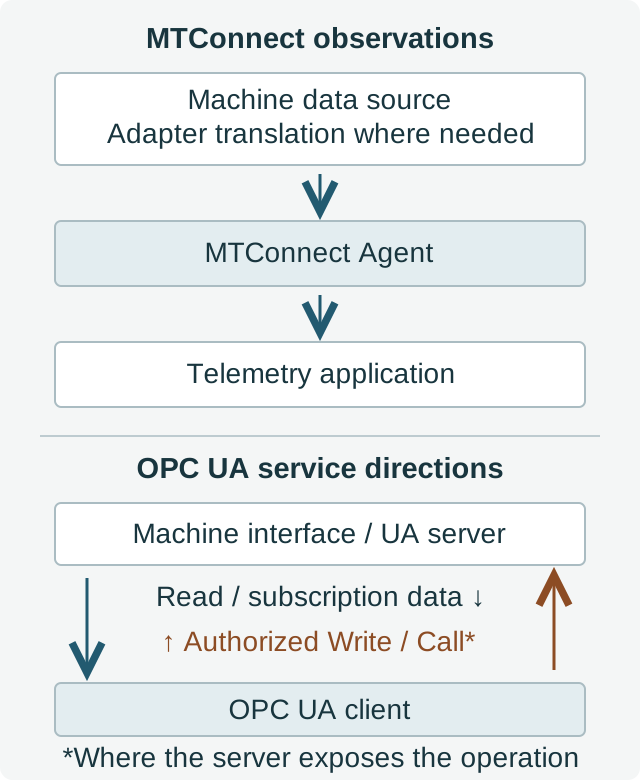
For integration acceptance, trace each request to its destination. A successful Agent upload belongs to the telemetry input record. A successful controller command belongs to the machine’s documented command and confirmation workflow.
What the MTConnect–OPC UA companion specification changes
The companion specification applies the MTConnect information model to OPC UA so a UA application can consume those machine-data semantics. It combines the standards rather than requiring a choice between their names. The OPC Foundation’s MTConnect overview describes this joint work. 3
Ask which companion version and model the server implements, which observations it exposes, and which of those the client understands. Match the implementation to the consuming application’s requirements. A companion-model mapping does not, by itself, create a recipe-loading method or make a PLC variable writable.
If a native OPC UA server already supplies the required observations with usable semantics, keep that path unless another consumer needs MTConnect. The MTConnect Institute’s FAQ explicitly notes that additional MTConnect semantics may be unnecessary when uniform semantics are already defined. Conversely, a consumer that needs MTConnect terms through UA gives the companion mapping a concrete purpose. 5
For packaging equipment, also identify the model implemented for that machine. The OPC UA packaging-data guide explains how packaging information models relate to companion specifications.
Where PLC recipe and command boundaries belong
OPC UA defines Write and Call services; the controller implementation determines which operations are available and permitted. Write addresses values of node attributes. Call invokes an exposed method with defined arguments. Data-change and event notifications use MonitoredItems and Subscriptions. None of those service names substitutes for the machine’s interface documentation. 4
Before enabling a recipe workflow, establish the writable fields or method, account permissions, accepted types and ranges, machine-state prerequisites, and application confirmation. Use the OEM’s documented recipe activation sequence where one is provided.

OPC UA Part 4, section 5.11.4, states that a multi-operation Write can succeed for some attributes and fail for others. Processing order within the request is undefined; clients needing sequential processing use separate service calls. A batch Write therefore cannot be treated as an atomic recipe transaction. 4
| Result or failure mode | Meaning for the application | Required handling |
|---|---|---|
Bad_NotWritable or Bad_UserAccessDenied |
The requested attribute cannot be written, or the user lacks permission | Resolve the exposed capability or approved role before resubmitting |
Bad_TypeMismatch or Bad_OutOfRange |
The submitted value fails the expected type or range constraints | Validate the request against the interface definition |
| Mixed results in one Write | Some operations may already have succeeded | Inspect every result and follow the controller’s documented recovery or rollback procedure |
Good_CompletesAsynchronously |
An intermediate system accepted the value; the server does not know whether the source updated correctly | Obtain source confirmation before declaring the write complete |
Bad_NotExecutable or a lost Call response |
A method may be unavailable in the current state; a lost response can leave its outcome unresolved | Check method status and machine state; resolve the outcome before repeating a command with side effects |
Part 4, section 5.12.2, explains that a method’s results can be discarded when its session terminates independently of the task performed at the server. A missing response therefore is not proof that the command failed to run. For recipe activation, distinguish three milestones: the request was accepted, the values reached the source, and the machine application confirmed the intended recipe state. 4
How to choose interfaces on a mixed production line
Keep supported machine interfaces and translate only to satisfy a defined consumer requirement. A line can collect MTConnect observations from a CNC machine and native OPC UA observations from another controller while keeping permitted command operations separately specified.
- Monitoring with an existing MTConnect interface: check the probe inventory, timestamps, units and state meanings against the application’s required fields.
- Monitoring with native OPC UA: check the implemented information model and available observations before adding an Agent or semantic conversion.
- A UA consumer that needs MTConnect semantics: evaluate an implementation of the companion mapping against the actual required items.
- Recipes or machine commands: qualify a supported control interface, its permissions and its completion behavior independently of the monitoring connection.
This selection follows the Institute’s distinction between semantics and transport and the Foundation’s companion-model purpose. It also makes ownership clear: record who maintains each adapter, Agent, server and client. 3, 5, 6
After selecting the machine interfaces, assess collection continuity separately. The industrial edge gateway and store-and-forward guide covers the next decision: how observations are retained and delivered during an upstream outage.
Machine-interface selection checklist
Complete one record per machine interface, with observations and commands listed separately. Use these acceptance questions with the equipment supplier or integrator before approving the connection design.
- Identify the implementation. Record machine and controller model, firmware, enabled or licensed interface, and the responsible OEM or integrator.
- List the required observations. Record the business meaning, data item, timestamp, unit, subtype and availability mapping. For MTConnect, retain the probe inventory and supported version.
- Match the consumer. Record its accepted interface and encoding. For OPC UA, identify the implemented model; explain the specific need for any MTConnect semantic translation.
- Locate the software roles. Record where the adapter, Agent, server and consuming application run and who maintains each one. Mark native functions and added components.
- Qualify each command. Record the documented writable field or method, permitted role, type/range or arguments, machine-state prerequisites and intended effect.
- Define completion and recovery. Specify how the client handles rejection, partial results, intermediate acceptance and lost responses. Identify the machine feedback used to confirm recipe activation.
- Record the selection. State which path supplies telemetry, which interface handles approved commands, and which observed results demonstrate acceptance for each path.
Technical references
The documents below establish the interface behavior and model boundaries used in this comparison.
- MTConnect Institute — MTConnect Part 1.0: Overview and Fundamentals, version 1.7.0, February 25, 2021. Introduction and sections 8.3.1–8.3.3: semantics, transport and probe/current/sample operations.
- MTConnect Institute — reference C++ Agent README.
JsonVersion,AutoAvailableand “HTTP PUT/POST Method of Uploading Data”: configurable output, availability and observation/asset ingestion. - OPC Foundation — MTConnect OPC UA Companion Specification overview. “Overview” and “Technical Content”: applying MTConnect models to OPC UA.
- OPC Foundation — OPC 10000-4, Services. Sections 5.11.4 (Write), 5.12.2 (Call) and 5.13.1.1 (MonitoredItem overview); Tables 55 and 61 cover operation results.
- MTConnect Institute — About and FAQ. “MTConnect standard,” “How do I use MTConnect?” and the question about existing protocols: vocabulary and when additional semantics help.
- MTConnect — Getting Started with MTConnect: Connectivity Guide, October 1, 2011. “Basics of MTConnect” and Appendix C: component roles and foundational data-item definitions.
- Mitsubishi Electric — Machine Tool Connectivity. “MTConnect” and “MTConnect Adapter”: read-only NC data acquisition in its adapter implementation.